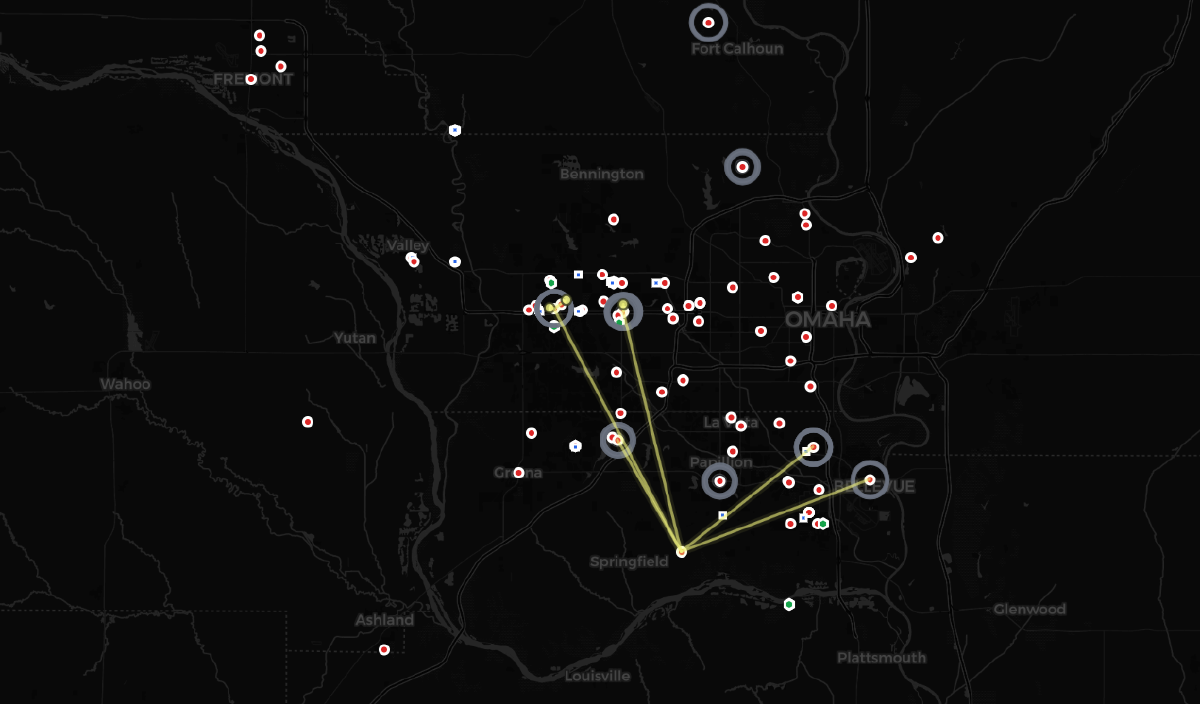
MCP, the Model Context Protocol, is what lets an AI agent like Claude call out to a tool over the internet. Look something up, run a query, fetch live data, bring the answer back into the conversation. Think of it as a phone line the AI can pick up to call outside services on your behalf, instead of only knowing what it already learned during training. Simple idea, sharp edge. The moment you stand up an MCP server that anyone’s agent can reach, you’ve built a piece of public internet infrastructure, and it inherits every problem that comes with that. I recently built one with zero authentication (meaning no login, no password, no API key, anyone can use it), on purpose, and open-sourced it. Here’s how I made that a defensible decision instead of a reckless one.
Key Takeaways#
- I built and shipped a public MCP server with zero authentication (no login required), deliberately, after confirming every piece of data it exposes was already public with no login required on the source it pulls from
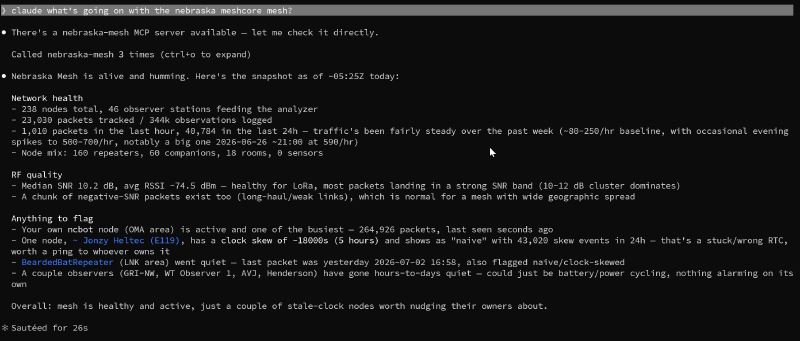
- Omaha’s MeshCore network is genuinely active: 238 nodes and 46 observer stations tracked live as of writing
- Rate limiting (a cap of 60 requests per minute per visitor) exists to protect the real analyzer from getting flooded through my server, not just to protect my own Cloudflare bill
- One unvalidated ID field could have let a crafted input like
..(the “go up a folder” trick) reach a different web address than the one it was supposed to reach - Every AI conversation with my server gets its own automatic 15-minute expiration timer, closing off a way an attacker could otherwise pile up abandoned sessions forever since there’s no login to stop them from opening new ones
- Configuration gets sorted into three tiers: real secrets, sensitive-but-not-quite-secret, and genuinely public, instead of one flat “secret or not” bucket
MeshCore, and Why Omaha Has a Front Row Seat#
MeshCore is an open protocol for LoRa mesh networking. Long-range, low-power radios that relay messages node to node without needing cell towers or internet infrastructure in between. It matters when normal networks go down, and honestly it’s just a fun, active hobbyist scene on top of that.
Omaha has a genuinely thriving MeshCore community. Node counts, message traffic, and observer coverage have been climbing steadily: as of writing there are 238 nodes and 46 observer stations active on the network. That’s real infrastructure, not a toy deployment. It’s tracked by a self-hosted instance of CoreScope, an open-source MeshCore packet analyzer, and every number that feeds this project comes from an unauthenticated public API on that instance.
Getting on the mesh yourself doesn’t take much. A basic LoRa radio node runs somewhere in the neighborhood of $20 to $50, and two of the more popular device makers for this kind of hobbyist mesh hardware are Seeed Studio and RAK Wireless. Flash the right firmware and you’re another node on the network.
That last detail (the public API) is what made this project possible. If I’m going to expose data through an AI agent, I want that data to already be public before it ever reaches my server, not public because I built the server.
What I Built#
meshcore-mcp is a Cloudflare Worker (a small program that runs on Cloudflare’s servers around the world instead of on a computer I have to manage myself) that speaks MCP and wraps six CoreScope endpoints as tools: network stats, node search, per-node detail, observer stations, network topology, and RF quality analytics. An “endpoint” here is just a specific web address that answers one kind of question, like “give me the current node count.” No database, no user accounts, no login. It’s live right now at meshcore-mcp.greymantlerisk.workers.dev, and any MCP-capable AI client can point at it and start asking questions about the Nebraska mesh.
It’s built on Cloudflare’s agents SDK, McpAgent backed by Durable Objects (small, isolated units of memory that Cloudflare spins up to hold onto a conversation’s state for a little while), which handles the MCP session and transport plumbing so I could focus on the part that actually mattered: making “no authentication” a safe design choice instead of a shortcut.
sequenceDiagram
    participant Client as AI Agent (MCP Client)
    participant Worker as Cloudflare Worker
    participant RL as Rate Limiter
    participant Session as Session (Durable Object)
    participant CoreScope as Nebraska Mesh Analyzer

    Client->>Worker: MCP request
    Worker->>RL: check rate limit
    alt over 60 req/min
        RL-->>Client: 429, rejected
    else within budget
        Worker->>Session: route to session
        Session->>Session: self-destructs 15 min after creation
        Session->>CoreScope: GET (validated params only)
        CoreScope-->>Session: JSON
        Session-->>Client: tool result
    end
How It’s Architected#
The whole thing is intentionally boring, which is the point. No database. No user accounts. No state beyond a session timer. Just a few pieces that each do one job:
McpAgent, from Cloudflare’sagentsSDK, handles the actual MCP protocol: the handshake (the AI and the server introducing themselves and agreeing how to talk), the session (one ongoing conversation), all of it. Every session gets backed by its own Durable Object.- Six tools, each a thin wrapper around one function in a small CoreScope client module. A “tool” in MCP terms is just one specific action the AI is allowed to ask for, like “look up this node” or “give me the network stats.” No tool contains business logic of its own. If it’s not a straight pass-through to an upstream
GETrequest (a request that only reads data, it can’t change or delete anything), it doesn’t belong in a tool. - The CoreScope client never has a hardcoded upstream baked into it. Every function takes the base URL (the address of the real analyzer it’s fetching from) as an explicit argument. That one decision is what makes it possible to keep the real upstream out of the codebase entirely and configure it at deploy time instead.
- A single
guarded()wrapper sits between every tool and its CoreScope call. It resolves configuration from the environment, and if anything throws (bad config, a validation failure, an upstream error) it catches that and turns it into a proper, readable error message instead of an ugly technical crash leaking back to the caller. - Session lifecycle (how long a session is allowed to stick around before it’s automatically cleaned up) is handled with one scheduled callback per session: set a timer on first connect, self-destruct when it fires, don’t reset on activity. That single mechanism is what keeps the “no auth means anyone can open a session” problem from turning into “no auth means sessions pile up forever.”
Nothing here is clever. Every piece is doing exactly one thing, which is exactly why it was easy to reason about when it came time to check it for security holes.
The Howto: Securing a Public, Authless MCP Server#
None of this is exotic. It’s the same handful of principles that apply to any public API, just applied to the specific shape of an MCP server. Here they are, roughly in order of how much they’d bite you if skipped.
1. Confirm “no auth” is actually safe before you ship it#
Don’t skip authentication (login/password protection) because it’s easier. Skip it because you’ve verified there’s nothing behind the server worth protecting. I read the actual upstream source code (the analyzer’s own program logic, not just its public-facing website) before writing a single tool wrapper, specifically to confirm every endpoint I planned to expose was already a public, read-only address with no way to change or delete anything through it. That verification is the whole justification for skipping auth. Without it, “no auth” is just negligence with better branding.
2. Rate-limit at the edge, to protect what you’re proxying, not just yourself#
The thing I was actually worried about wasn’t my own Cloudflare bill. It was some enthusiastic (or careless) AI agent hammering the real Nebraska Mesh analyzer through my server and degrading service for the humans who run it. Rate limiting is basically a bouncer that caps how many requests one visitor can make per minute, so a runaway script can’t flood the place. Cloudflare’s Workers Rate Limiting binding handles this in a few lines of config:
"ratelimits": [
  {
    "name": "RATE_LIMITER",
    "namespace_id": "1001",
    "simple": { "limit": 60, "period": 60 }
  }
]
Sixty requests per minute per IP, checked before any request reaches the MCP handler. Generous for normal use, useless for abuse.
3. Validate anything that builds a URL path, even for “just a GET request”#
It’s tempting to think read-only endpoints don’t need input validation (checking that a piece of data is actually what you expect before using it). They do. One tool takes a pubkey (a unique ID for a mesh node) and builds a web address out of it: /api/nodes/[that ID]/health. Left unvalidated, someone could pass in .. instead of a real ID. That’s the same trick as typing “go up one folder” in a file browser, and it gets computers to jump to a completely different web address than the one the tool was supposed to visit. The fix is a strict allowlist pattern (only accept characters that could plausibly be a real ID, reject everything else) before the value touches a web address at all:
const pubkeyPattern = /^[0-9a-fA-F]{4,64}$/;

function assertValidPubkey(pubkey: string): void {
  if (!pubkeyPattern.test(pubkey)) {
    throw new CoreScopeError(400, `invalid pubkey: ${pubkey}`);
  }
}
Cheap to write. Closes the whole bug class instead of patching one symptom of it.
4. Give session-backed compute an explicit lifetime#
Every MCP session in this architecture gets its own little slice of dedicated memory (a Durable Object) to hold onto while the conversation is active. With no authentication, anyone can start one of those, which means without a limit, an attacker (or just a lot of legitimate traffic) can pile them up indefinitely, like leaving the water running in every room of a hotel that never checks anyone out. Each session now self-destructs 15 minutes after it’s created, regardless of activity:
async onStart(props?: Record<string, unknown>) {
  await super.onStart(props);
  await this.schedule(SESSION_TTL_SECONDS, "selfDestruct", undefined, {
    idempotent: true,
  });
}

async selfDestruct() {
  await this.destroy();
}
The idempotent: true setting matters more than it looks. It tells the system “if this timer’s already running, don’t start a second one.” Without it, the code that re-checks the session every so often would accidentally set a brand new countdown timer each time, instead of trusting the one clean timer already ticking.
5. Sort your config into tiers. Not everything that “isn’t public” is a secret#
I ended up with three distinct categories of configuration, and treating them all the same would’ve been a mistake in both directions:
- Real secrets (Cloudflare API token, which works like a password that lets automated tools publish updates to my server). Stored as a GitHub Actions repo secret (an encrypted value GitHub holds onto and only reveals to the automated publishing process, never displayed anywhere), scoped to the single permission the deploy actually needs, never logged, never written into a plain config file.
- Sensitive-but-not-secret (Cloudflare account ID, basically an account number). Cloudflare itself doesn’t classify this as sensitive, but there’s no reason to publish it either, so it’s also a repo secret. Just not a high-stakes one.
- Genuinely public config (the upstream URL, a display name). These are GitHub repo variables, a similar mechanism to secrets but visible rather than encrypted, since there’s nothing to hide, and they get injected at deploy time so they’re never hardcoded into a template someone else might reuse against infrastructure they don’t own.
Three tiers, three handling rules. Collapsing them into “secret or not” loses information that actually matters.
6. Gate CI deploys on push, not pull_request#
A CI/CD pipeline is the automated process that takes new code and publishes it live, without a human manually copying files around. If that pipeline deploys with real credentials and your code is public, anyone in the world can propose a change (a “pull request”) to your project. GitHub doesn’t hand your secrets to automated jobs triggered by a stranger’s proposed change by default, but I gate the deploy step explicitly anyway, rather than relying on a platform default I’m not the one controlling:
if: github.event_name == 'push' && github.ref == 'refs/heads/main'One line. Cheap insurance against a future workflow edit accidentally widening the blast radius.
The Deploy Pipeline Had Its Own Rough Edges#
Worth a quick mention. Getting the actual Cloudflare deploy working cleanly took a few more rounds than the code itself. A fresh Cloudflare account needs a free web address claimed before anything will publish at all, the access token has to be scoped to the whole account rather than one specific website, and I found a real bug in one of Cloudflare’s own publishing tools where settings with a space in them got silently corrupted during deploy (fixed by publishing a slightly different way). None of it was a security problem exactly, but all of it was the kind of thing that costs you an evening if you don’t know to expect it.
Try It Yourself#
The server’s live at mesh.greymantlerisk.com, and you can point your own AI agent at it right now. No account, no API key, nothing to sign up for.
If you use Claude Code, one command adds it:
claude mcp add --transport http meshcore https://mesh.greymantlerisk.com/mcpIf you use Claude Desktop, add this to your MCP server config (Settings > Developer > Edit Config):
{
	"mcpServers": {
		"meshcore": {
			"command": "npx",
			"args": ["mcp-remote", "https://mesh.greymantlerisk.com/mcp"]
		}
	}
}
Or if you just want to poke at it without installing anything, drop the URL into the Cloudflare AI Playground, a browser-based MCP client Cloudflare provides for exactly this. Then ask your agent something like “what’s going on with the Nebraska MeshCore mesh right now” and watch it actually go look.
The code behind it is public and GPL-3.0 licensed, a working reference for anyone wiring an MCP server to real infrastructure: github.com/Greymantle-Risk-Advisory/meshcore-mcp.
This is the same thinking I bring to client work. Authentication is one tool among several, not the whole security model, and the interesting question is almost never “did you add auth.” It’s “did you verify what happens if you didn’t.” If you’re building something that’s going to talk to the public internet (an API, an integration, an AI agent with tool access) and you want a second set of eyes on the threat model before it ships, that’s exactly the kind of conversation worth having early.